Installed by InterAcct · Odoo 18 & 19

Know the true cost of every job.

Estimates, quotes and actuals in one thread - so the budget you priced is the budget you measure against, sub-job by sub-job.

One-off & perpetual · first year of updates included · Download Lite free →

JOB 24-0142 Wollongong North - fit-out
Labour$41,200 / 48,000
Materials$63,900 / 58,000
Subbies$22,400 / 35,000
Machines$8,900 / 12,500
Sundry$1,750 / 4,000
Actual vs budget $138,150 / $157,500
Odoo 18 & 19 Community & Enterprise Built by InterAcct Software Pty Ltd. Works on isolated networks - no internet required.

What Pro adds

Costing built for how the work actually runs.

Lite covers the fundamentals. Pro is for the jobs with phases, crews on site, and a financial picture that has to add up at the end.

Break a job into sub-jobs.

Model a project as hierarchical phases - each sub-job carries its own estimate, budget and actuals, and rolls up to the parent automatically.

  • Parent/child phases with independent budgets
  • Costs and revenue roll up to the master job
  • A project & analytic account created per job, automatically
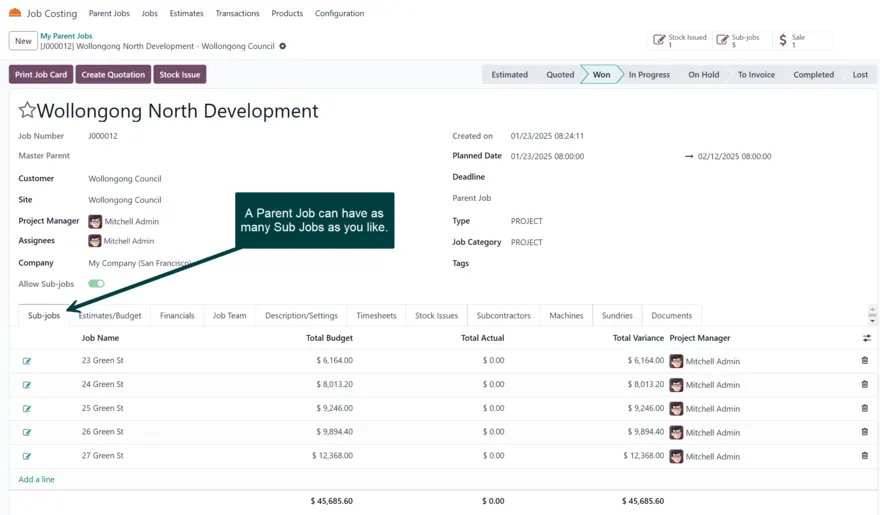
Sub-jobs hierarchy in Odoo

Budget vs actual, live.

Labour flows from timesheets, materials from stock moves, and bills for machines, subbies and sundries - so every category shows planned against real, the moment it lands.

  • Five cost categories: labour, materials, subbies, machines, sundry
  • Cost, sell, profit, markup & margin per category
  • Financial dashboard & job analysis reports
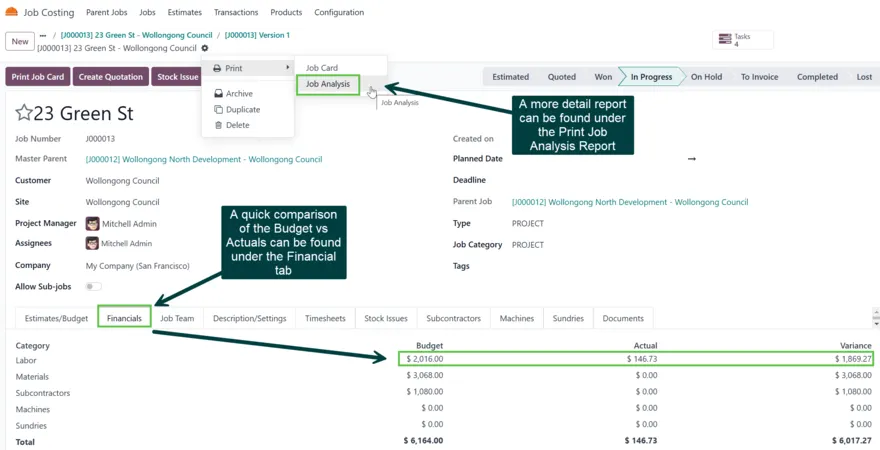
Sub-job financials dashboard

Quote straight from the estimate.

Turn a costed estimate into an itemised or summary quotation in a click - grouped how the client wants to see it, with section lines and your margins already applied.

  • Itemised or single-line summary quotes
  • Group by job, sub-job or estimate
  • A unique cost-item code created per quote
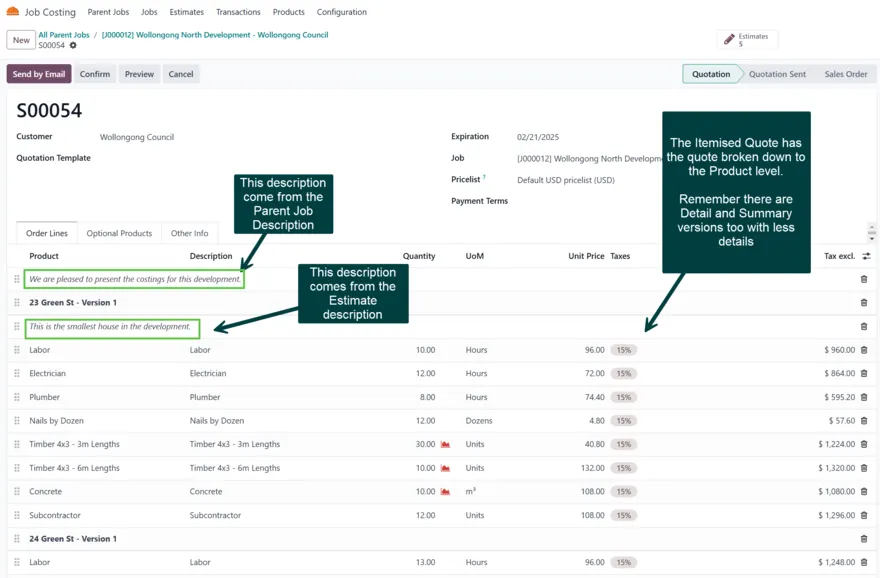
Itemised quotation output
FS

Field Service

Spin up a Field Service project and tasks from a job, with timesheets costed back automatically.

KT

Manufacturing kits

Explode a kit into its components on the estimate, native to Odoo - no third-party dependency.

JC

Job cards & barcodes

Printable job cards with barcodes for the crew on site to pick, issue and track against.

SI

Stock issues

Issue materials to a job with your chosen default movement type, straight from the budget lines.

RF

Required fields & guards

Make customer, PM, job type or category mandatory - and block deletes on jobs with real costs.

MF

Manufacturing mode

Drive quantities to make and unique finished-product codes for build-to-order work.

Lite vs Pro

Start free. Upgrade when the jobs get bigger.

CapabilityLite · freePro
Jobs, estimates & actuals
Quotations from estimates
Stock issues
Sub-jobs (phases)-
Field Service integration-
Manufacturing kits-
Financial dashboard & analysis-
Job cards & barcodes-
PriceFree$600 one-off

Pricing

Buy it once. Own it for good.

A perpetual licence for your Odoo version - not a subscription. Your first year of maintenance is included; renew annually to keep receiving bugfixes and new features.

$600 one-off · perpetual
  • Every Pro feature, unlocked
  • Yours forever, for the Odoo version you buy it for
  • First year of updates & support included
  • Runs on up to 3 databases (prod, staging, test)
  • Activates offline - perfect for isolated site networks
Talk to us first

Renewal

Maintenance keeps your version current.

Bugfixes and new features for the Odoo version you run - and most people run one for years. Skip a renewal and Pro keeps working; you simply stop getting new releases until you come back. Catch-up back-pay is capped, so returning is never a shock.

Moving to a new Odoo version later is a separate licence. Lite stays free, forever.

Questions

The things buyers actually ask.

What if I don’t renew maintenance?

Pro is perpetual - it keeps working forever. You just stop receiving new releases and support until you renew. Nothing locks, and no data is touched.

Does it work offline or on a local network?

Yes. If your Odoo has no internet, you activate with a signed licence file downloaded from the portal - no connection between your server and ours is ever required.

Which Odoo versions are supported?

Odoo 18 and 19, on both Community and Enterprise. A licence is for one Odoo version - you buy Pro for the version you run, and it’s yours on that version forever.

What happens when I upgrade Odoo?

Moving to a new Odoo major version means a new licence for that version - the same as on the Odoo Apps Store. Most people stay on one version for years, so this doesn’t come up often. Your old licence keeps working on the old version, indefinitely.

I let maintenance lapse - how do I catch up?

Renew from where you left off. Back-pay is capped, so coming back after a long gap never means paying for every missed year.

Can I run Odoo 18 and 19 at the same time?

Yes - that’s two licences, one per version, each with its own maintenance and its own three databases.

See it on your data

Request a demo.

Tell us a little about your setup and we’ll walk you through Pro on a job like yours.

We’ll only use this to arrange your demo.